Few things are as frustrating as an induction cooktop that suddenly decides to shut off in the middle of preparing a meal. This unexpected interruption can throw off your cooking rhythm and leave you wondering if your appliance is faulty. However, more often than not, an automatic shutdown isn’t a sign of a broken cooktop, but rather its sophisticated safety mechanisms at work, designed to protect both the appliance and your home. Understanding why your induction cooktop powers down on its own is the first step toward efficient troubleshooting and ensuring a seamless cooking experience. This guide will delve into the most common reasons behind these automatic shutdowns and provide practical solutions to get you back to culinary creation.
Understanding Your Induction Cooktop’s Safety Mechanisms
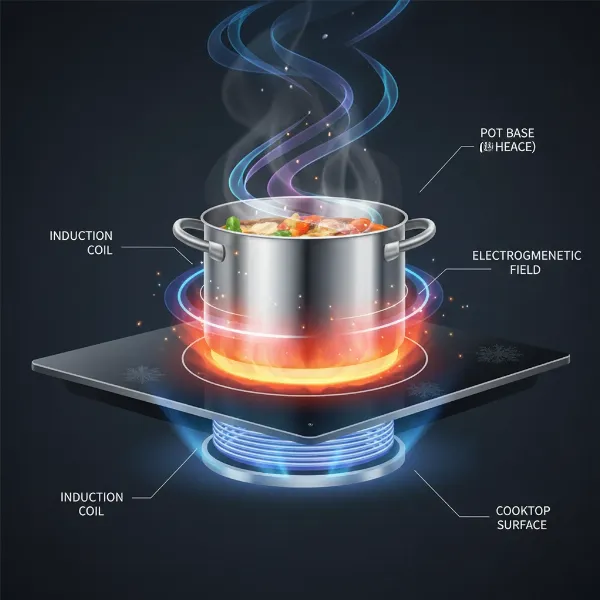
Induction cooktops operate on the principle of electromagnetic induction, creating a magnetic field that directly heats the cookware itself, rather than the cooktop surface. This innovative technology offers remarkable efficiency, precise temperature control, and enhanced safety compared to traditional gas or electric stoves. However, even with these advancements, various scenarios can lead to an induction cooktop triggering its built-in safety features and shutting off automatically.
The primary role of these automatic shut-off mechanisms is to prevent potential hazards like overheating, electrical damage, or even fires. Modern induction cooktops are equipped with an array of sensors and intelligent programming that constantly monitor operating conditions. When these systems detect an anomaly or a condition that exceeds safe parameters, they respond by cutting power to prevent further issues, often displaying an error code to help diagnose the problem. This proactive shutdown capability is a testament to the design philosophy prioritizing user safety and appliance longevity.
Common Reasons Your Induction Cooktop Shuts Off
Most automatic shutdowns can be traced back to a few common culprits. Addressing these issues often requires simple adjustments or troubleshooting steps.
Overheating: The Primary Culprit
Overheating is arguably the most frequent reason an induction cooktop will shut itself off. These appliances generate significant heat internally, and robust cooling systems are in place to dissipate it. However, certain conditions can overwhelm these systems.
- Blocked Ventilation: Induction cooktops, especially built-in models, require adequate airflow to cool their internal components. If the vents beneath or around the cooktop are obstructed by cookware, cleaning cloths, or built-up debris, heat can accumulate, leading to overheating. Always ensure that the ventilation gaps are clear and unobstructed.
- Prolonged High-Power Use: Continuously operating a cooking zone at its maximum power setting for extended periods can generate excessive heat, even with proper ventilation. The cooktop’s thermal sensors will detect this rise in temperature and initiate a shutdown to protect the electronics. Allowing the cooktop to cool down for a few minutes before resuming operation is often the recommended solution.
- Empty Cookware: Placing an empty pot or pan on a hot cooking zone and activating it can cause the pan to heat up very rapidly and unevenly, potentially triggering the cooktop’s overheating protection. Always ensure there is food or liquid in your cookware before turning on the burner.
|
Our Picks for the Best Induction cooktop in 2026
As an Amazon Associate I earn from qualifying purchases.
|
||
| Num | Product | Action |
|---|---|---|
| 1 | Amazon Basics 1800W Portable Electric Induction Cooktop, Burner and Child Lock, Overheat Protection, Timer, 8 Power Settings, Temperature Control Up to 440°F, for Cookware Diameter 5.7"-8.2", Black |

|
| 2 | ChangBERT Portable Induction Cooktop Enhanced Version, One-Click Max Power 1800W Large Heating Coil Burner, Precise Temperature Control, NSF Certified Commercial Grade Low Noise Hot Plate |
|
| 3 | Nuwave Double Pro Cooktop Induction Countertop Burner, Portable, 900/1500/1800W with Dynamic Watt Technology, 50°F to 575°F, 8” Heating Coil, Shatter-Proof Ceramic Glass, Seamless IMD Touch Panel |
|
| 4 | Nuwave Pro Chef Induction Cooktop, NSF-Certified, Commercial-Grade, Portable, Powerful 1800W, Large 8” Heating Coil, 94 Temp Settings 100°F - 575°F in 5°F, Shatter-Proof Ceramic Glass Surface |
|
| 5 | ChangBERT Induction Cooktop NSF Certified Professional Chef Edition Stove, 1800W Commercial Induction Burner with Schott Glass, Large Heating Coil Electric Hot Plate for Restaurant Hotel Food Station |
|
| 6 | Empava Portable Induction Hot Plate Cooktop, Single 1 Burner Countertop Cooker, 3 Preset Modes, Shatter-proof Flat Glass Top, 110~120 Volt Plug in Electric Stove for Kitchen, Outdoor Camping, RV |
|
| 7 | Nuwave Flex Precision Induction Cooktop, 10.25” Shatter-Proof Ceramic Glass, 6.5” Heating Coil, 45 Temps from 100°F to 500°F, 3 Wattage Settings 600, 900 & 1300 Watts, Black |
|
| 8 | ChangBERT Induction Cooktop, Commercial Grade Portable Cooker, Large 8” Heating Coil, Premium Stainless Steel Countertop Burner with NSF Certified, 10 Hours Timer Powerful 1800W Professional Hot Plate |
|
| 9 | Duxtop Portable Induction Cooktop, Countertop Burner Induction Hot Plate with LCD Sensor Touch 1800 Watts, Silver 9600LS BT-200DZ |
|
| 10 | Duxtop 1800W Portable Induction Cooktop Countertop Burner, Gold 8100MC/BT-180G3 |
|
Incompatible or Improperly Placed Cookware
Induction cooktops require specific types of cookware. If your cookware isn’t suitable, the cooktop won’t be able to generate heat, and it will eventually shut off.
- Magnetic Base Requirement: Only pots and pans with a ferromagnetic base will work on an induction cooktop. If a magnet sticks firmly to the bottom of your cookware, it’s generally compatible. Non-magnetic materials like glass, aluminum (unless specially designed for induction), or ceramic will not be recognized. If the cooktop doesn’t detect a pan, it will typically beep and shut off after a few seconds or minutes, often displaying an error code like “E0” or “E1.”
- Pan Size and Placement: For optimal heating and detection, the base of your cookware should cover a significant portion of the cooking zone. If the pan is too small, or if it’s not centered correctly on the zone, the magnetic field might not be properly established, leading to inconsistent heating or an automatic shutdown. Using warped or uneven cookware can also cause detection issues.
Automatic Time Limitations
Many induction cooktops incorporate a safety feature that automatically turns off a cooking zone after a certain period if no user interaction is detected. This “auto-off” timer varies depending on the power level selected; higher settings typically have shorter time limits. This prevents accidental prolonged heating if you forget to turn off a burner. If your cooktop shuts off without an error code after a long period of inactivity, this safety feature is likely the cause.
Power Management and Load Sharing
Modern induction cooktops, especially those with multiple cooking zones, often include intelligent power management systems. These systems are designed to distribute the total available electrical power across multiple active zones. If you have several burners operating at high power simultaneously, the cooktop might temporarily reduce the power to one or more zones or even shut one off to prevent exceeding the circuit’s electrical load. This is a normal function and not an indication of a fault.
Control Panel Interference
The touch-sensitive control panels on induction cooktops can be highly responsive, and sometimes, they can be inadvertently triggered.
- Spills and Objects: Liquids spilled onto the control panel, a wet cleaning cloth resting on it, or even utensils and other objects placed directly on the controls can be interpreted as button presses. This can confuse the system, leading to beeping, error codes, and ultimately, an automatic shutdown as a safety precaution. Keeping the control area clean and dry is crucial.
- Child Lock Activation: Most induction cooktops come with a child lock feature that disables the controls to prevent accidental activation. If this lock is engaged, the cooktop might appear unresponsive or shut off if you try to operate it without first deactivating the lock.
“Many users mistake an automatic shutdown for a malfunction, but in most cases, it’s the cooktop’s smart safety system doing its job. Understanding these built-in protections is key to troubleshooting effectively.” – Chef Elena Rodriguez, Culinary Technology Expert
Electrical and Installation-Related Issues
While less common for routine shutdowns, electrical problems can also cause an induction cooktop to power off automatically. These issues often require professional attention.
Unstable Power Supply or Voltage Fluctuations
Induction cooktops are sensitive to the quality of their electrical supply. Fluctuations in voltage—either too high or too low—can disrupt the internal electronics and trigger a protective shutdown. An unstable power supply can stem from issues within your home’s wiring, a shared circuit with other high-power appliances, or even problems with the utility grid. In some cases, specific error codes (like E3/E4, E9000, E9010, U1, U400 depending on the brand) can indicate a voltage issue.
Tripped Circuit Breaker
Your home’s electrical circuit breaker acts as a safety device, automatically cutting off power if it detects an electrical overload, short circuit, or surge. If your induction cooktop draws too much current, or if there’s an internal electrical fault, the dedicated breaker for the cooktop (or even the main house breaker) can trip, causing an immediate and complete power loss to the appliance. Resetting a tripped breaker might restore power, but if it trips repeatedly, it indicates a persistent electrical problem that needs investigation.
Faulty Components: Fan, Sensors, or Circuit Board
Over time, or due to manufacturing defects, internal components of your induction cooktop can fail.
- Malfunctioning Cooling Fan: If the internal cooling fan is faulty or obstructed, it cannot adequately dissipate heat, leading to internal component overheating and subsequent shutdown, often indicated by an E6 error code.
- Defective Temperature Sensors: The cooktop relies on various temperature sensors to monitor its internal temperature and the temperature of the cooking zone. A faulty sensor might provide incorrect readings, causing the cooktop to shut off prematurely, even if it’s not actually overheating. Error codes like E5, F3, F4, F9, or FA can point to sensor failures.
- Circuit Board Issues: The main control board is the brain of your induction cooktop. Any damage or fault within this complex electronic component can lead to unpredictable behavior, including automatic shutdowns. Issues with the circuit board often require professional repair or replacement.
Decoding Induction Cooktop Error Codes
When your induction cooktop shuts off automatically, it will often display an error code. These codes are invaluable diagnostic tools, providing a specific hint about the underlying problem. While codes can vary by brand, here are some common examples and their general meanings:
| Error Code | Possible Cause | Quick Troubleshooting | When to Call a Pro |
|---|---|---|---|
| E0 / E1 | No pan detected / incompatible cookware | Check pan compatibility and placement | If valid cookware is always undetected |
| E2 / E6 | Overheating / cooling fan issue | Allow to cool, check ventilation | If cooling fan is visibly not working or issue persists |
| E3 / E4 | Abnormal supply voltage (too high/low) | Check household power supply, unplug and replug | If voltage fluctuations are common, or problem persists |
| E5 / F3 / F4 | Internal temperature sensor fault | Restart the hob | If error persists after restart |
| F1 / F2 / F6 | Cooking zone or electronics overheating | Allow to cool down, ensure proper ventilation | If constant overheating occurs without clear cause |
| F8 | Automatic time limitation activated | Simply interact with controls to resume | If it occurs too frequently or at unusual times |
| F9 / FA | IGBT temperature sensor failure (internal) | Contact customer support, power reset | Immediately, as it indicates a critical internal fault |
| U1 / U400 | Incorrect input voltage | Contact electrical utility provider | Immediately, if it indicates a persistent grid issue |
| All displays flashing | Wet control panel or object on controls | Dry the panel, remove object | If controls remain unresponsive after cleaning |
Always refer to your specific cooktop’s user manual for the most accurate interpretation of error codes and recommended solutions.
Troubleshooting Steps: What You Can Do
Before calling for service, try these practical steps to diagnose and potentially resolve the issue yourself.
For Overheating Concerns
- Allow Cooling Time: If the cooktop feels hot, turn it off completely and allow it to cool down for at least 15-30 minutes.
- Check Ventilation: Ensure all vents around and beneath the cooktop are clear. Remove any items that might be obstructing airflow.
- Use Proper Cookware and Avoid Empty Pans: Always use induction-compatible cookware that covers a reasonable portion of the cooking zone, and never heat an empty pan.
- Adjust Power Levels: Avoid continuous use at maximum power. If you need high heat, consider cycling between high and slightly lower settings.
For Cookware Issues
- Test for Magnetism: Use a fridge magnet to check if your pot or pan has a ferromagnetic base.
- Proper Placement: Ensure the cookware is centered on the cooking zone and its base is flat and making good contact.
- Check Pan Size: Use cookware that is appropriately sized for the burner you are using.
For Control Panel Problems
- Clean and Dry: Thoroughly wipe the control panel with a dry cloth to remove any moisture, food residue, or foreign objects.
- Check Child Lock: If your cooktop has a child lock, ensure it is disengaged according to your user manual.
For Power Supply Checks
- Inspect Connections: Visually check if the power cord is securely plugged into the outlet.
- Reset Circuit Breaker: If a breaker has tripped, toggle it off and then on again. If it trips again immediately, do not force it.
- Avoid Overloading Circuits: If your cooktop shares a circuit with other powerful appliances, try using them separately or consult an electrician about dedicated circuits.
When to Call a Professional
While many issues can be resolved with simple troubleshooting, some situations warrant the expertise of a qualified appliance technician or electrician.
- Persistent Error Codes: If an error code reappears even after attempting the recommended troubleshooting steps, it might indicate a more complex internal fault.
- Repeated Shutdowns: If your cooktop frequently shuts off, especially without an apparent cause or despite your best efforts to resolve it, there could be an underlying issue with internal components like the control board, sensors, or wiring.
- Visible Damage or Electrical Concerns: Any signs of burning, unusual smells, sparking, or repeated circuit breaker trips are serious electrical concerns. In such cases, immediately disconnect power to the cooktop (if safe to do so) and call a professional without delay. Attempting to fix complex electrical problems yourself can be dangerous and may void your warranty.
Conclusion
An induction cooktop that automatically shuts off can be a puzzling inconvenience, but it’s typically a clear sign that its advanced safety features are engaged. From simple issues like incompatible cookware or blocked ventilation to more complex electrical or component failures, understanding the root cause is essential for a quick resolution. By familiarizing yourself with your cooktop’s functions, understanding common error codes, and performing basic troubleshooting, you can often restore your appliance to full working order. Remember, when in doubt or faced with persistent problems, a certified professional is your best resource for ensuring both the longevity of your cooktop and the safety of your kitchen.
What steps have you found most effective in preventing your induction cooktop from shutting off unexpectedly?
Frequently Asked Questions
Why does my induction cooktop keep beeping and turning off?
Frequent beeping followed by a shutdown often indicates a safety mechanism has been triggered. Common causes include incompatible or improperly placed cookware, liquids spilled on the control panel, or the cooktop overheating due to blocked ventilation or prolonged high-power use. Check your cookware, clean the control panel, and ensure proper airflow around the appliance.
Is it normal for an induction cooktop to cycle on and off?
Yes, for many induction cooktops, particularly at lower power settings, it is normal to hear or sense the burner cycling on and off. This pulsing action is how the cooktop maintains a consistent lower temperature, delivering intermittent bursts of power rather than a continuous low current. This is different from an unexpected shutdown due to a fault.
Can an empty pan cause an induction cooktop to shut off?
Yes, placing an empty pan on an active induction burner can cause it to shut off. Without contents to absorb the energy, the pan can heat up very quickly, potentially triggering the cooktop’s overheating protection or the appliance’s safety sensor if it detects abnormal conditions. Always add food or liquid before heating.
How long does an induction cooktop stay on before auto shut-off?
The automatic shut-off time for an induction cooktop varies depending on the brand, model, and the power level selected. Generally, higher power settings have shorter auto-off times (e.g., 60 minutes at max power), while lower settings allow for longer operation (e.g., several hours at low power) before automatically turning off if there’s no user interaction.
What does an “E” error code mean on an induction cooktop?
“E” error codes on induction cooktops generally indicate a problem detected by the appliance’s internal diagnostics. For instance, E0 or E1 often signify no pan detection or incompatible cookware, E2 or E6 might indicate overheating or a cooling fan issue, and E3 or E4 could point to an abnormal power supply voltage. Always consult your cooktop’s specific user manual for precise error code meanings.