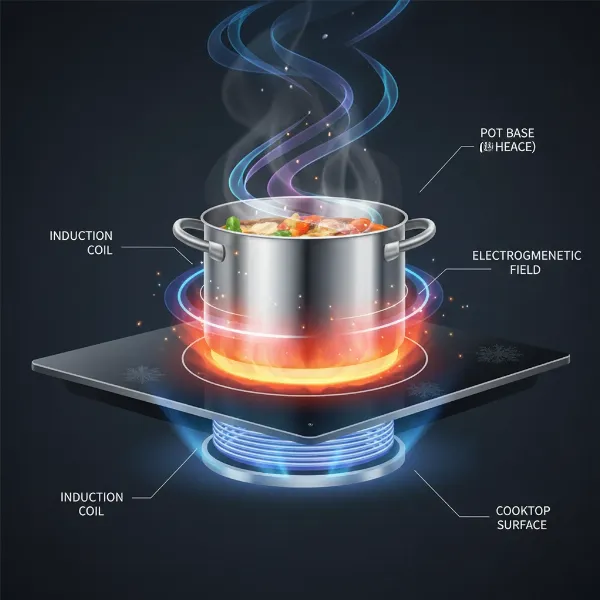
An induction cooktop is a marvel of modern kitchen technology, offering precise heat control and energy efficiency. However, like any sophisticated appliance, it can sometimes display cryptic error codes that bring your cooking to a sudden halt. These digital alerts, while initially alarming, are designed to be diagnostic tools, providing insights into potential issues ranging from simple user errors to more complex internal faults. Understanding these common error codes and their solutions can save you time, reduce frustration, and help you get back to creating culinary masterpieces. This comprehensive guide will demystify the most frequent induction cooktop error codes, explain their underlying causes, and provide practical troubleshooting steps to help you resolve them quickly and safely.
Understanding Induction Cooktop Error Codes
Induction cooktop error codes are built-in alerts that appear on your appliance’s digital display when it detects an irregularity or problem. They serve as a vital communication system, signaling that something requires your attention without needing you to guess the cause. These codes are part of the cooktop’s self-diagnostic capabilities, designed to protect the unit from damage and ensure safe operation.
Why do these errors occur? Common culprits include issues with cookware compatibility, insufficient ventilation leading to overheating, fluctuations in the power supply, or internal component malfunctions such as faulty sensors or cooling fans. While the specific codes can vary between brands and models, many share common themes and underlying problems.
When an error code appears, your first step should always be to consult your cooktop’s user manual, as it will provide brand-specific information. A general first step is to perform a “power cycle” by turning off the cooktop, unplugging it or switching off its circuit breaker for 30 seconds to a minute, and then restoring power. This can often clear temporary glitches.
Common Induction Cooktop Error Codes and Their Solutions
Understanding the specific message behind each code is key to effective troubleshooting. Here are some of the most frequently encountered error codes and how to address them:
E0 / E1: No Pan or Unsuitable Cookware
These codes typically indicate that the induction cooktop cannot detect a suitable pot or pan on the cooking zone, or that the cookware being used is incompatible.
- Cause: The cooktop requires magnetic, flat-bottomed cookware to function. Common issues include using non-induction compatible materials (like aluminum or glass), a pan that is too small or too large for the cooking zone, or simply no pan being present.
- Quick Fix:
- Ensure you are using induction-compatible cookware. Look for a coil symbol on the bottom of your pots and pans, or test them with a magnet (if it sticks, it’s compatible).
- Place the pan centrally on the cooking zone.
- Verify the pan size matches the designated cooking zone.
|
Our Picks for the Best Induction cooktop in 2026
As an Amazon Associate I earn from qualifying purchases.
|
||
| Num | Product | Action |
|---|---|---|
| 1 | Empava Portable Induction Hot Plate Cooktop, Single 1 Burner Countertop Cooker, 3 Preset Modes, Shatter-proof Flat Glass Top, 110~120 Volt Plug in Electric Stove for Kitchen, Outdoor Camping, RV |

|
| 2 | Nuwave Flex Precision Induction Cooktop, 10.25” Shatter-Proof Ceramic Glass, 6.5” Heating Coil, 45 Temps from 100°F to 500°F, 3 Wattage Settings 600, 900 & 1300 Watts, Black |
|
| 3 | Duxtop Portable Induction Cooktop, Countertop Burner Induction Hot Plate with LCD Sensor Touch 1800 Watts, Silver 9600LS BT-200DZ |
|
| 4 | ChangBERT Induction Cooktop NSF Certified Professional Chef Edition Stove, 1800W Commercial Induction Burner with Schott Glass, Large Heating Coil Electric Hot Plate for Restaurant Hotel Food Station |
|
| 5 | Duxtop 1800W Portable Induction Cooktop Countertop Burner, Gold 8100MC/BT-180G3 |
|
| 6 | Nuwave Double Pro Cooktop Induction Countertop Burner, Portable, 900/1500/1800W with Dynamic Watt Technology, 50°F to 575°F, 8” Heating Coil, Shatter-Proof Ceramic Glass, Seamless IMD Touch Panel |
|
| 7 | Nuwave Pro Chef Induction Cooktop, NSF-Certified, Commercial-Grade, Portable, Powerful 1800W, Large 8” Heating Coil, 94 Temp Settings 100°F - 575°F in 5°F, Shatter-Proof Ceramic Glass Surface |
|
| 8 | ChangBERT Portable Induction Cooktop Enhanced Version, One-Click Max Power 1800W Large Heating Coil Burner, Precise Temperature Control, NSF Certified Commercial Grade Low Noise Hot Plate |
|
| 9 | Amazon Basics 1800W Portable Electric Induction Cooktop, Burner and Child Lock, Overheat Protection, Timer, 8 Power Settings, Temperature Control Up to 440°F, for Cookware Diameter 5.7"-8.2", Black |
|
| 10 | ChangBERT Induction Cooktop, Commercial Grade Portable Cooker, Large 8” Heating Coil, Premium Stainless Steel Countertop Burner with NSF Certified, 10 Hours Timer Powerful 1800W Professional Hot Plate |
|
E2 / E3 / E5 / F1 / F2 / F4 / F5: Overheating
Error codes in this range usually point to an overheating issue, which is a protective measure to prevent damage to the appliance.
- Cause: The cooktop, its induction coil, or internal sensors (like the IGBT sensor) have reached an excessively high temperature. This can be due to prolonged high-heat cooking, blocked ventilation vents, a faulty cooling fan, or even hot cookware placed too close to the control panel.
- Quick Fix:
- Turn off the cooktop immediately and remove any cookware.
- Allow the appliance to cool down completely, typically for at least 10-30 minutes.
- Check that the cooktop’s ventilation vents (usually underneath or around the edges) are not blocked by cloths, food debris, or surrounding objects. Ensure there is adequate airflow around and beneath the unit.
- If hot cookware was near the control panel, move it away.
- Restart the cooktop after it has cooled.
E3 / E4 / E6 / U1 / U400 / E9000 / E9010: Voltage Supply Issues
These codes signal problems with the electrical power supply, which can be critical for the cooktop’s operation.
- Cause: The voltage supplied to the cooktop is either too high or too low, or the power supply is unstable. This can be caused by household electrical fluctuations, issues with your home’s wiring, or external grid problems.
- Quick Fix:
- Check other electrical appliances in your home to see if they are experiencing similar power issues.
- Ensure the cooktop is correctly plugged into a dedicated, properly grounded outlet if it’s a portable unit, or professionally wired if it’s a built-in model.
- If the problem persists, it may indicate an issue with your home’s electrical wiring. In this case, it is crucial to consult a qualified electrician to inspect your mains supply.
E6 / E8: Cooling Fan Problems
These codes often relate specifically to the internal cooling system of your induction cooktop.
- Cause: A malfunction of the cooling fan, which is essential for dissipating heat, or obstruction of the air vents. If the fan isn’t working correctly, internal components can quickly overheat.
- Quick Fix:
- Turn off the cooktop and ensure all air intake and exhaust vents are clear of obstructions.
- Allow the cooktop to cool down.
- If the error persists and you can confirm the fan is not operating (or is unusually noisy), it may indicate a faulty fan motor. This typically requires professional service.
F0 / F1 (Touch Panel) / All Displays Flashing: Control Panel Issues
Problems with the control panel can prevent you from operating the cooktop entirely.
- Cause: The control panel might be wet, have objects resting on it, or there could be an internal fault with the touch sensors or electronics. Some codes, like F0 or F1 on certain models, can specifically indicate a touch control panel malfunction.
- Quick Fix:
- Ensure the control panel is completely dry and free of any spills.
- Remove any objects (utensils, cloths, food items) that might be covering or touching the control surface.
- Perform a power cycle to reset the electronics. If the problem reappears immediately, an internal component may be faulty.
E5 / E9 / EA: Internal Sensor Faults
These codes generally point to issues with the cooktop’s internal temperature sensors.
- Cause: One of the various internal temperature sensors (e.g., induction coil sensor, IGBT sensor) might be faulty or disconnected, leading to incorrect temperature readings or an inability to regulate heat.
- Quick Fix:
- Perform a power cycle by turning off and unplugging the cooktop (or switching off its circuit breaker) for a few minutes before restarting.
- If the error code persists, it often indicates a hardware failure that requires professional diagnosis and repair, as these sensors are integral to the cooktop’s safe operation.
dE: Demo Mode Activated
This is a less common but easily fixable “error” where the cooktop appears to be on but isn’t heating.
- Cause: The induction cooktop has inadvertently entered demonstration mode, a setting often used in showrooms where features can be displayed without generating heat.
- Quick Fix: The method to deactivate demo mode varies by brand. Often, it involves a combination of a power cycle (unplugging for 30 seconds) followed by holding down a specific button (like the power button or a timer button) for several seconds within a short timeframe after reconnecting power. Refer to your user manual for the exact procedure.
Prevention and Best Practices for Your Induction Cooktop
Proactive maintenance and correct usage can significantly reduce the occurrence of error codes and extend the life of your induction cooktop.
Proper Cookware Selection
Always use cookware specifically designed for induction. Look for a flat, magnetic base. Using the correct size pan for each cooking zone ensures efficient heating and prevents the “no pan” error.
Ensuring Adequate Ventilation
Proper airflow is crucial for dissipating heat from the internal components. Regularly check that the cooktop’s vents are not obstructed by cloths, spilled food, or nearby appliances. Ensure sufficient space around and beneath built-in cooktops as per installation guidelines.
Regular Cleaning and Maintenance
Keep your cooktop clean, especially the control panel. Wiping up spills immediately prevents liquid from seeping into sensitive electronics and causing “wet panel” errors. Use a soft cloth and mild cleaner; avoid abrasive materials that can scratch the surface.
Understanding Power Requirements
Ensure your induction cooktop is installed by a qualified electrician and connected to an appropriate power supply. Stable voltage is vital for preventing errors related to electrical fluctuations. Avoid using extension cords or adapters for high-power induction units.
When to Call a Professional Technician
While many common error codes can be resolved with simple troubleshooting, there are instances when professional intervention is necessary for safety and effective repair.
You should contact a qualified technician if:
- An error code persists despite your troubleshooting efforts, especially after a power cycle.
- You notice unusual smells, smoke, or strange noises coming from the cooktop.
- There is visible damage to the cooktop’s surface or controls.
- The error codes point to internal component failures (like faulty sensors or fan motors) that are beyond basic user repair.
- You have concerns about electrical safety or the power supply.
Attempting to repair complex internal issues yourself can be dangerous and may void your warranty.
Frequently Asked Questions About Induction Cooktop Errors
Can I fix all induction cooktop errors myself?
No, not all errors can or should be fixed by yourself. Simple issues like incompatible cookware or blocked vents are user-fixable. However, errors indicating internal component failure, electrical supply problems, or persistent malfunctions typically require a qualified technician for safe and effective repair.
How do I reset my induction cooktop?
To reset most induction cooktops, first, turn off the appliance using its main power button. Then, disconnect it from the power source by either unplugging it from the wall outlet or switching off the dedicated circuit breaker in your home’s electrical panel. Wait for 30 seconds to 1 minute, then restore power. This “power cycle” often clears temporary electronic glitches.
What kind of cookware should I use to avoid errors?
To avoid “no pan” or “unsuitable cookware” errors, use induction-compatible cookware with a flat, magnetic base. Materials like cast iron, magnetic stainless steel, and enameled steel work well. Always ensure the pan’s diameter matches the cooking zone size as closely as possible.
Why does my induction cooktop keep beeping?
Persistent beeping often accompanies an error code, indicating that the cooktop requires attention. It could be due to a pan detection issue, an object on the control panel, overheating, or a general system fault. Address the associated error code or clear the control panel to stop the beeping.
Conclusion
Encountering an error code on your induction cooktop doesn’t always signal a major disaster. By understanding what these codes mean, performing basic troubleshooting, and following best practices, you can often resolve issues quickly and keep your kitchen running smoothly. Remember to prioritize safety, consult your user manual for brand-specific details, and never hesitate to call a professional technician for complex or persistent problems. With a little knowledge, you can confidently navigate the world of induction cooktop errors and continue to enjoy the benefits of this advanced cooking technology. What’s your most common induction cooktop challenge?